


Deluxe Moon - Moon Calendar, P
4.9547.00 Reviews
App Specs
- Version
- 1.110
- Updated On
- License
- $3.99
- Downloads
- 50,000+
- Developer
- LWS Research
- Categories
- Weather
- Platform
- Android
Screenshots
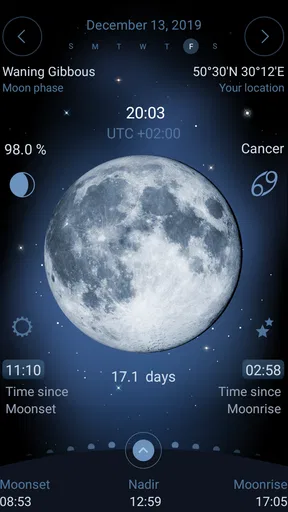
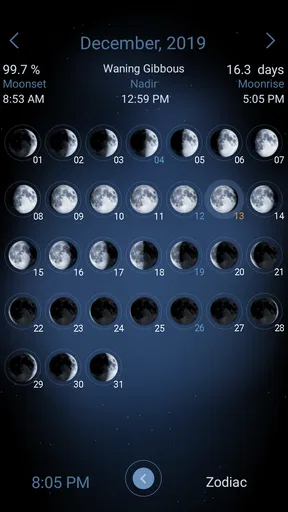
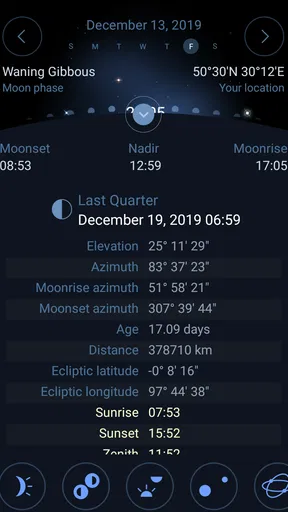
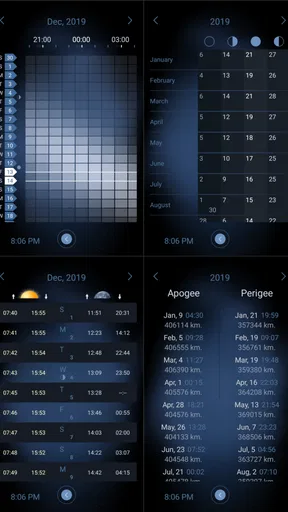
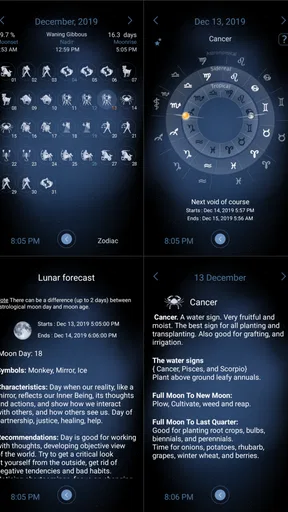
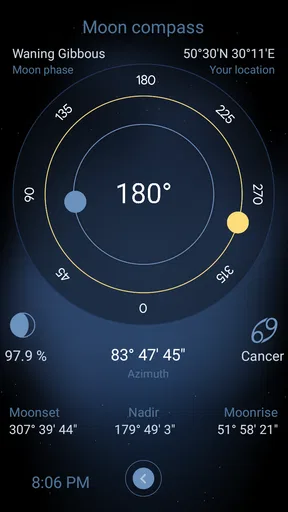
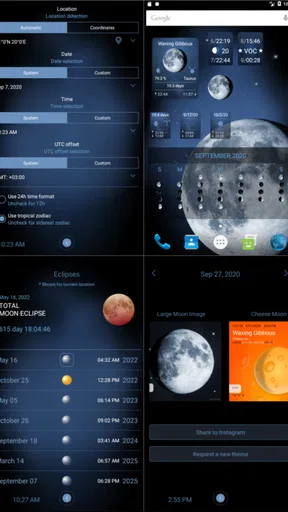
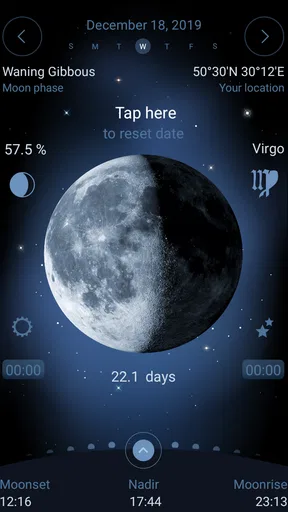
 Analysis by AppCompare
I enjoy weather apps that do one job clearly, but lunar calendars occupy a slightly different space. They are less about tomorrow’s rain and more about understanding the Moon’s changing appearance, timing, and place in the sky. Deluxe Moon is built for that purpose: it is a paid weather app from LWS Research that focuses on lunar information rather than trying to become an all-in-one forecast dashboard. After spending time with it, I found it most useful as a visual planning tool for people who regularly look at the Moon, photograph the night sky, garden by lunar phases, or simply want a more thoughtful alternative to checking a tiny Moon icon in a standard weather app.
The first thing to understand is the app’s personality. It is not trying to replace a conventional forecast service, and it is not aimed at someone who only wants to know whether to carry an umbrella. Its store summary presents it as a lunar calendar, and that description is a better guide than the broad weather category. The experience is centered on the Moon and its calendar rather than on hourly temperatures, radar maps, or severe-weather alerts. That focus is its main strength, but it also explains why some users may open it and wonder where the usual weather tools are.
Where the experience can feel confusing
The most likely point of friction is expectation. A person searching under weather apps may assume that every product in the category includes forecasts, location-based conditions, and notifications. This one is much more specialized. If I were recommending it to a friend, I would explain before installation that it is best treated as a dedicated lunar reference, not as the only weather app on a phone. That simple distinction prevents most disappointment.
The second adjustment is learning to read the information as a calendar rather than as a single daily answer. A normal weather app often gives me an immediate sentence: clear, cloudy, warm, or wet. A lunar calendar asks a different kind of question: what phase is the Moon in, how will that phase change, and when is a particular night likely to be interesting? The benefit is a broader view, but it requires a little more attention from the user.
Some people may also find the visual presentation more important than expected. A lunar app lives or dies by how quickly I can connect its symbols, dates, and Moon imagery with what I will actually see outside. If I am checking it while preparing for an evening walk, I want the phase and calendar context to make sense at a glance. If I have to repeatedly interpret an unfamiliar screen, the app feels slower even when the underlying information is useful.
That is why I would not judge it after opening only one screen. The value becomes clearer when I use it for a specific purpose: choosing an evening for Moon watching, checking the lunar phase across several days, or planning a photography session. A quick glance can make it seem like a decorative calendar, while a planned use reveals whether its lunar focus fits my routine.
What to check before deciding
The paid price matters here because the app is not a casual, free add-on that I install and forget. It costs $3.99, so I would decide based on how often I expect to use lunar information. For someone who looks at the Moon once or twice a year, a free calendar or a general astronomy resource may be enough. For someone who wants a dedicated lunar reference close at hand, paying once can feel more reasonable than accepting a cluttered collection of unrelated tools.
Worth Reading Before You Choose

EA SPORTS FC Mobile 26 Is a Bigger Football Game, but It Takes Time

Flipboard Shows What News Apps Must Do Beyond the Feed

Switching to Android Auto Means Rethinking Your Driving Routine

Google Calendar Makes a Crowded Week Easier to Manage

Ludo King Makes the Most of the Minutes Between Plans

Baby Panda World Brings Quick Play to Modern Phones, but Its Game Library Feels Busy
The audience rating is Everyone, which makes it approachable for families and younger users who are curious about the night sky. That does not mean every child will find it instantly intuitive. Younger users may still need an adult to explain why the Moon appears to change shape and why a calendar view is useful. In my experience, the app works best when it becomes part of a real activity rather than being presented as another screen to explore without context.
Compatibility is another practical check. The current version is 1.110, and the minimum operating system is Android 6.0. That covers many older devices, but I would still verify the phone’s system version before buying, especially if the device has been kept for several years or receives updates irregularly. This is a small step, yet it avoids the most frustrating kind of setup problem: paying for an app before discovering that the device cannot run it.
LWS Research has kept this product available since its release on Jul 8, 2010, and that long presence gives it a different feel from a brand-new utility. It is a focused tool with an established identity rather than a recently launched experiment. The audience response is also notably strong, with a 4.9 average from around 3.1 thousand ratings and more than 500 reviews. Those figures do not guarantee that I will like the interface, but they do suggest that the app’s specialized purpose has found a receptive audience.
Simple setup checks that prevent avoidable trouble
My first setup check would be to confirm the device’s date, time, and time zone. Lunar calendars depend on the calendar context, so an incorrect phone clock can make any date-based information feel wrong even when the app itself is working normally. If a phase appears out of step with what I expect, I would check the system clock before reinstalling anything.
I would also confirm that the app is being opened on the intended device and account after purchase. Paid apps can create confusion when a person uses several accounts or changes phones. The safest general approach is to use the same store account associated with the purchase and allow the device a moment to finish its normal app installation process. I would not repeatedly buy the app simply because it does not appear immediately after switching devices.
Another useful check is orientation and display comfort. Lunar information is often easier to understand when the screen is not crowded by unusually large text, display zoom, or accessibility settings that alter the layout. I would not disable accessibility features just to make the app look a certain way, but I would temporarily compare the standard display setting if controls seem hidden or misaligned. This is especially relevant on older phones with smaller screens.
Before deciding that a calendar entry is inaccurate, I would compare several neighboring dates rather than relying on one isolated screen. A lunar cycle is continuous, and the meaning of a date becomes clearer when I look at the days before and after it. This is one of the most practical habits for using a specialized calendar: treat it as a sequence, not as a collection of unrelated icons.
If the app opens but appears stuck, I would start with the ordinary checks that apply to any mobile application: close it, reopen it, restart the phone, and make sure the operating system is not waiting for a pending update. I would avoid jumping straight to clearing storage or deleting the app, because those steps can remove local preferences and rarely solve a simple display or account issue.
Recovering a useful workflow when something feels off
The best recovery method depends on what has gone wrong. If the screen is merely confusing, I would return to the main calendar view and choose one question at a time. First I might identify the date, then the Moon’s phase, and only afterward explore any additional context shown by the app. Trying to understand every symbol at once makes a focused tool feel unnecessarily complicated.
If the date seems wrong, I would check the phone’s regional settings and then move through the calendar manually. A mismatch caused by a time-zone boundary can be especially easy to misread around midnight. Looking at the previous and following date helps me see whether the issue is a real display problem or simply a difference between the local date and the date I had in mind.
For a photography workflow, I would use the app before leaving home rather than standing in the dark trying to make decisions on the spot. I might review several possible evenings, note the phase I want, and then use a separate weather service to check clouds and conditions. This two-app approach is more reliable than expecting a lunar calendar to answer both the astronomical and meteorological parts of the plan.
That separation is an important trade-off. A general weather app is usually better for immediate outdoor safety, temperature, rain, wind, and changing conditions. Deluxe Moon is more useful for the lunar side of the decision. I would use the former to decide whether going outside is sensible and the latter to decide what Moon-related subject I might see. Neither replaces the other cleanly.
For gardening or personal routines, I would avoid treating a lunar phase as a guarantee of results. The app can help me organize dates around the lunar calendar, but it cannot turn a calendar entry into a substitute for soil conditions, seasonal knowledge, sunlight, or local weather. Used as a planning reference, it is convenient. Used as the only basis for an important decision, it is too narrow.
When the app is not the cause
Not every disappointing result comes from the application. A cloudy sky can hide the Moon even when the calendar is correct. Bright city lighting can make a promising evening look underwhelming. A poor viewing angle, nearby buildings, or a short observation window can also change what I experience outdoors. This matters because a lunar app can tell me about the calendar, but it cannot control visibility at my exact spot.
Location can create another layer of confusion. Two people in different places may not have the same practical viewing experience on the same date, even if they are looking at the same lunar phase. I would therefore use the app as a timing aid and combine it with my own horizon, local conditions, and available darkness. That approach is more realistic than expecting a calendar entry to describe the entire sky from every location.
It is also worth separating an information problem from a device problem. If the interface is slow, the phone may be short on available memory or running many background processes. If the screen looks distorted, display scaling or the device itself may be involved. Restarting the phone and checking whether other apps behave normally are sensible first steps. Reinstalling a paid app should be a later option, not the automatic response.
When a purchase does not appear correctly, I would first check the account used on the device and the normal store purchase history. If the issue continues, the appropriate next step is official store or developer support rather than downloading an unofficial copy. That keeps the installation safe and avoids creating a second problem while trying to solve the first.
Privacy-conscious users may also want to think about how they prefer to use a weather-related app. I like that a focused lunar calendar can be useful without requiring me to turn it into a constant notification source. I would keep the experience deliberately simple: open it when I need lunar information, make my plan, and close it. That habit reduces distraction and makes the app feel like a reference tool instead of another service competing for attention.
Small habits that make the calendar more useful
My favorite practical habit is to plan by windows rather than by one supposedly perfect night. I would check the lunar calendar several days ahead, choose a phase that suits my goal, and keep a backup evening in mind. This is especially helpful for photography, because clouds or poor visibility can ruin a carefully chosen date. The app handles the lunar planning part; flexibility handles the real world.
A second useful habit is to record what I actually saw. After an evening outside, I might note whether the Moon was visible from my location and whether the phase looked as expected. Over time, this gives the calendar personal context. It also helps me distinguish a problem with my viewing conditions from a problem with the app’s calendar display.
A third insight is to use the app as a teaching prompt rather than as a passive picture. With a child or beginner, I would choose a date, look at the expected shape, and then compare it with the sky later. That turns the calendar into a simple observation exercise. The Everyone rating makes this kind of shared use comfortable, although the adult still needs to provide the explanation.
I would also avoid using the app while rushing. Its value is strongest when I have a reason to consult it and a little time to interpret the calendar. If I only need a quick forecast before commuting, opening it is the wrong workflow. That is not a defect in the lunar focus; it is a reminder to choose the right tool for the question.
My practical verdict after using it
Deluxe Moon is a good fit for someone who wants a dedicated Moon calendar and is willing to pay for a focused experience. I would recommend it to amateur sky watchers, casual photographers, families exploring lunar phases, and anyone who enjoys planning outdoor observations around the Moon. Its strong 50K-plus install base shows that it is not an obscure experiment, while the high average rating indicates that many users appreciate its specialized approach.
I would not recommend it as a replacement for a standard weather app. If my daily needs are rain alerts, temperature changes, wind, or travel forecasts, I would choose a conventional weather service first. I would also skip it if I rarely think about lunar phases and would prefer a free, minimal calendar entry. The $3.99 price is easier to justify when the app becomes part of a repeated routine.
The most important trade-off is depth versus immediacy. A general weather app gives me fast practical answers about the atmosphere. This app gives me a more deliberate way to follow the Moon’s calendar. That makes it less useful for hurried decisions but more satisfying for people who want to plan, observe, and learn.
For me, the best setup is not choosing between the two categories. I would keep my usual weather tool for conditions and use this one for lunar planning. I would check the phone’s date and time before trusting a calendar view, review several dates instead of one, and prepare a backup plan for clouds or poor visibility. Those small habits remove most of the friction and make the app’s narrow purpose genuinely useful.
In the end, LWS Research has made a specialized weather app that earns its place by staying focused. It is not the right choice for everyone, and its paid model asks me to know what I want before installing it. But if the Moon is the part of the sky I actually want to follow, the strongest reason to choose it is its focused lunar workflow rather than a long list of unrelated weather tools. That clarity is what makes it worth recommending to the right person.
Pros
- Detailed lunar phases
- zodiac positions
- and moonrise information
- Interactive calendar makes it easy to explore past and upcoming lunar events
- Useful widgets provide moon data without opening the full app
- Supports multiple locations for more accurate local moon information
- Visually appealing interface with atmospheric moon imagery
Cons
- Many advanced features require a paid upgrade
- The amount of astronomical data may overwhelm casual users
- Some information depends on an active internet connection
- Widgets can consume additional battery and home-screen space
- Astrology-related content may not appeal to strictly scientific users
FAQs for Deluxe Moon - Moon Calendar, P
What is Deluxe Moon - Moon Calendar used for?
Deluxe Moon - Moon Calendar is designed to help users follow the lunar cycle and understand how the Moon may influence daily planning, gardening, wellness routines, and personal observations. It provides information about moon phases, illumination, zodiac positioning, moonrise and moonset times, and other astronomical details in a visually organized format. It is best considered an informative planning and observation tool rather than a scientific or medical authority.
Does Deluxe Moon provide accurate moon phase and astronomical information?
The app is intended to calculate and display moon phases, lunar illumination, rise and set times, and related sky information based on your selected location and date. Accuracy can depend on the device location settings, time zone, and the quality of the underlying astronomical calculations. For casual observation and planning, the information is generally useful, but users who need professional-grade precision should verify important data with an observatory, astronomy service, or official astronomical source.
Does the app require my location, and can I use it manually?
Deluxe Moon can use your location to show locally relevant information such as moonrise, moonset, lunar visibility, and the Moon’s position. You may need to grant location permission for automatic setup, but users who prefer greater privacy can usually select a city or enter location details manually, depending on the app version. Reviewing permission requests before continuing is recommended, especially if location access is not essential for your intended use.
Is Deluxe Moon suitable for astrology, gardening, or wellness planning?
The app includes lunar and zodiac information that may appeal to people interested in astrology, lunar gardening traditions, meditation schedules, or personal routines connected with moon phases. However, its recommendations should be treated as cultural, spiritual, or personal guidance rather than proven scientific advice. The app cannot predict health outcomes, guarantee gardening results, or replace professional medical, agricultural, or psychological guidance.
Is Deluxe Moon free, and are there advertisements or in-app purchases?
Availability, pricing, advertising, and included features may differ between the Android and iOS versions and can also change after updates. Before downloading, check the official store listing for the current price, subscription details, in-app purchases, and any limitations in the free version. Users should also review the developer’s privacy information and cancellation terms, particularly if premium features or recurring payments are offered.


